The map and the spine
Two screens do most of the work. The map is every conversation you have. The spine is one of them, reduced to what happened in it.
The map
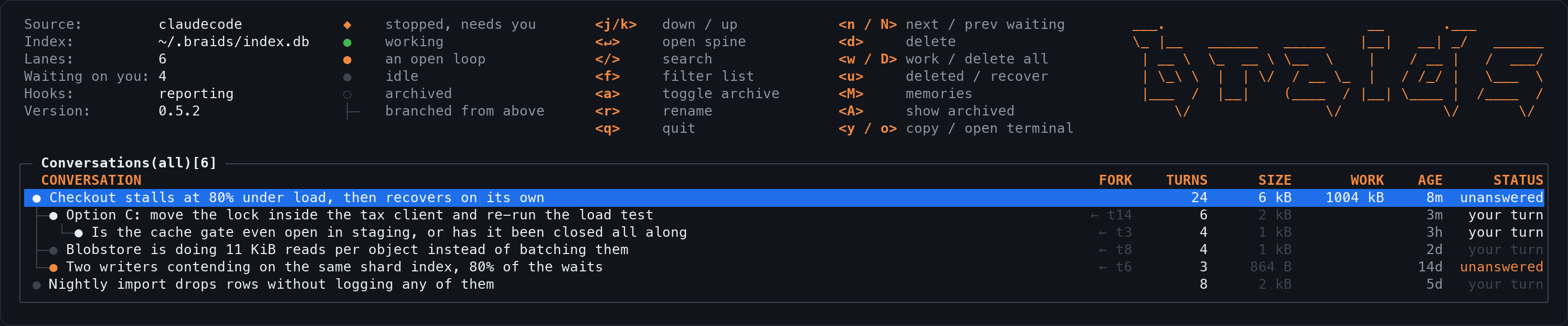
One row per conversation. A branch is indented under its parent and tagged
with the turn it left at, so ← t14 means this conversation
starts from turn 14 of the row above it. The columns are the title, the fork
point, how many turns, how big the transcript is, how much scratch the
session wrote, how long ago it was touched, and what state it is in.
State is the column to scan. your turn means the session asked you something and stopped. unanswered means the last thing in the transcript is yours. n and N walk between them, so a morning can start by pressing n until it runs out.
| Key | What it does |
|---|---|
| j / k | down, up |
| ↵ | open the spine |
| / | search everything |
| f | filter this list by title |
| n / N | next, previous conversation waiting on you |
| r | rename this conversation |
| a / A | archive this one, show archived ones |
| d | move this conversation to the bin |
| w / D | browse its work products, or bin all of them |
| u | open the bin |
| M | open memories |
| y / o | copy the resume command, or open it in a terminal |
| q | quit |
| v | run the installer, when the header offers it |
The spine
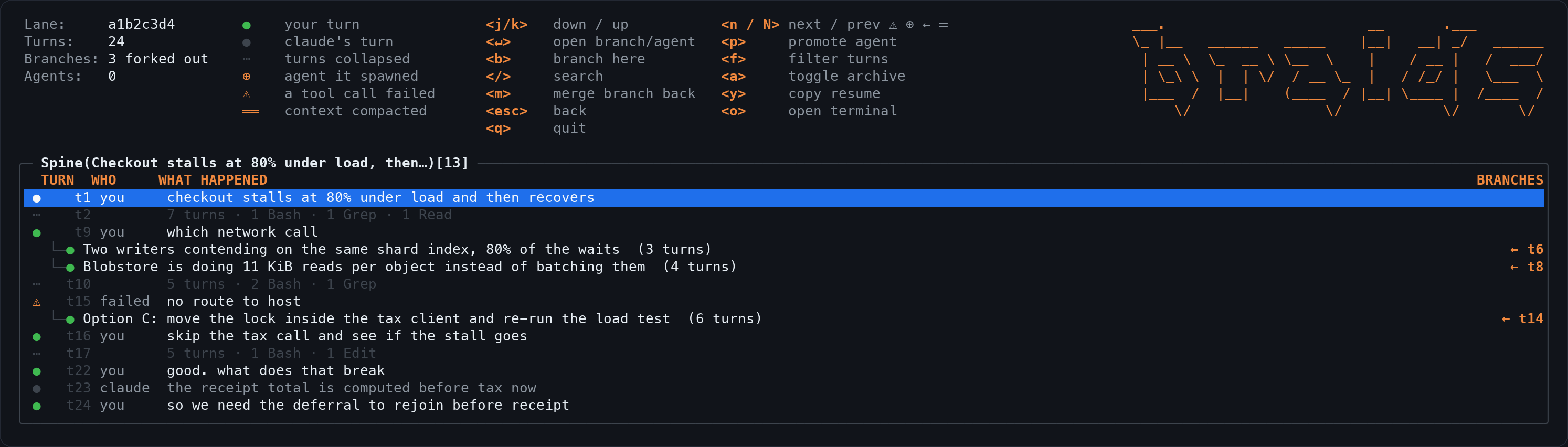
A long conversation is mostly turns you do not need to see again. The spine keeps the landmarks and collapses the rest into a run marker that counts what it swallowed. A conversation of 25,000 turns becomes a few hundred rows, and reloading it takes about 30 ms.
| Mark | What it means |
|---|---|
| ● | a turn: yours in the bright colour, the model's in the dim one |
| ⋯ | a run of turns nothing notable happened in, with how many |
| ◆ | a subagent this conversation spawned |
| ⚠ | a tool call that failed |
| ≈≈ | the context was compacted here |
| ← t14 | a branch leaves here, at turn 14 |
n stops at each of those marks in turn, which is the fastest way through a conversation you have not read in a week.
| Key | What it does |
|---|---|
| j / k | down, up |
| ↵ | follow the branch or subagent on this row |
| b | branch a new conversation here |
| m | merge a branch back into this one |
| p | promote the subagent on this row |
| f | filter turns by text |
| n / N | next, previous mark |
| y / o | copy the resume command, or open it in a terminal |
| esc | back to the map |
The version row
The header names the build always, and once nobody has checked for updates in
a month it grows · 3 months old · v to update. The key rides in
that row rather than in the legend on purpose: a fifteenth binding would need
a third column of hints, and that column costs the glyph key, which names
marks that are on the screen right now.
v runs the installer, which is the only thing in braids that reaches the network, and it prints the command before running it. See Files and privacy.
It keeps up on its own
Opening the map catches it up first. Nothing touches the index while braids is closed, so without this the map showed whatever was true the last time it was open: a week away, and it stayed a week out of date until something happened to a file while you were watching it. On a history of 66,000 messages that catch-up costs about 70 ms, because a transcript whose size and modification time have not moved is never opened.
After that it watches the transcript directory, the memory directories and the index. When a session writes a turn while you are looking at it, braids reads only the bytes that were added, off the drawing thread, and the row updates in place. Reading the whole file again would take about 3.3 seconds on a 145 MB conversation. Reading the tail takes about 40 ms.
If you sit on the spine of a live conversation, new turns appear as they land. The cursor stays where you put it.
Filter is not search
f filters the list in front of you, by substring, and every screen has it. / opens search across everything you have indexed. They are different tools and both are always available. When a filter is open the header says so, because a screen quietly eating your keystrokes is worse than no filter at all.
Printing a frame, and awkward terminals
braids --print                  # one frame of the map to stdout
braids --print --lane 46360382  # that conversation's spine
braids --print --query lock     # the search screen for a query
braids --print --width 195 --height 24
braids --ascii                  # narrow glyphs, for terminals that draw the box
                                # characters double width
Print mode is how the screenshots in these docs are made, so what you see
here is what the program draws. Set BRAIDS_ASCII to make the
narrow glyphs the default.